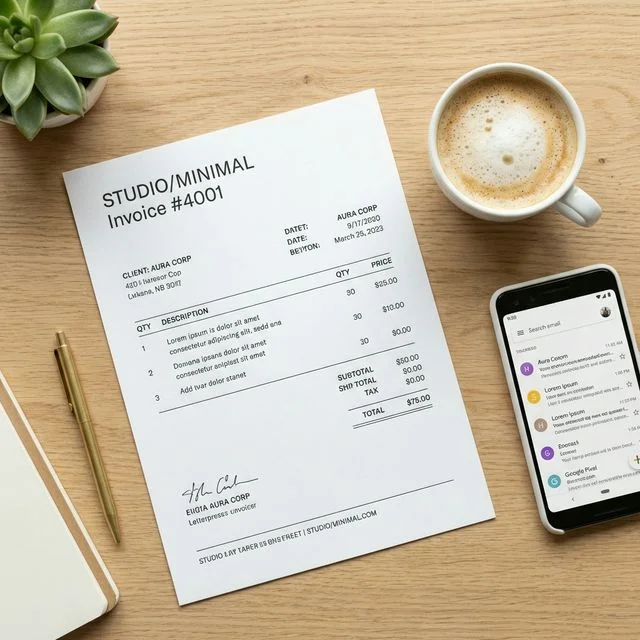
The Hidden Psychology of Financial Document Design
In the digital freelance and corporate consulting world, your brand is not merely your logo or your website. Your brand extends aggressively into every single touchpoint you have with your client—most vitally, your financial documentation. When a client receives an invoice that looks like a chaotic, unformatted Microsoft Word document desperately mashed together ten minutes before an email was sent, it radically degrades their perception of your professional value. Conversely, a beautifully branded, logically structured, and mathematically pristine professional invoice PDF triggers an immediate psychological assumption: this person is an elite professional, their operations are highly organized, and their premium pricing is entirely justified.
Why the Native PDF Format Remains the Undisputed Global King
While dynamic web links and SaaS portals have attempted to digitize the payment flow natively in the browser, the static PDF (.pdf) remains the absolute global standard for B2B (Business-to-Business) accounting. Why? Because PDF formats are highly rigid, virtually immutable without specialized software, and look utterly identical whether they are opened on a massive 32-inch 4K corporate desktop monitor in Tokyo or on a tiny 6-inch cracked iPhone screen in an airport lounge in London. They are the ultimate, universally accepted accounting ledger. Furthermore, corporate accounting departments absolutely require local static files (like PDFs) to upload into their own massive ERP systems (like SAP or Oracle) for long-term secure archival. If you just send them a casual web link to a "floating" web invoice, you are forcing their internal accounting team to manually print your webpage to PDF, creating frustrating, unnecessary friction that actively delays your payout.
Step 1: The Visual Foundation and Brand Alignment
The very first question any new freelancer or small business owner asks is, "What should an invoice look like?" It should look like an elegant, logical extension of your primary corporate brand identity.
- Symmetrical Logo Placement: Your company logo should be mathematically aligned at the very top of the document (typically left-aligned or centered), rendered in high-definition (SVG or high-res PNG). Pixelated, blurry logos instantly scream "amateur," destroying your credibility before the client even looks at the dollar amount.
- The Strategic Color Palette: Never, ever use raw black (#000000) for your massive structural borders or table headers. It is visually aggressive and cheap. Instead, utilize your brand’s primary accent color, or a sophisticated deep charcoal or slate blue. This provides immense visual contrast while remaining highly readable when the client inevitably prints the PDF on a cheap black-and-white office printer.
- Modern Typography Selection: Please, for the sake of your brand, abandon Times New Roman and standard Arial. Modern digital documents should utilize clean, highly legible Sans-Serif fonts like Inter, Roboto, or Helvetica. Your typography should dramatically separate the bolded headers (like "Total Due") from the lighter body text (like the itemized descriptions).
Step 2: Structuring the Visual Information Hierarchy
A brilliantly designed PDF invoice generator free from watermarks will automatically structure your data in a way that guides the client’s eye directly to the most vital pieces of information: How much do I owe, and exactly how fast do I need to pay it?
- The Document Title: The word "INVOICE" must be the absolute largest typographical element on the entire page. It must establish immediate, unquestionable context.
- The Critical Metadata: Directly beneath the title, utilizing a clean, tabular layout, clearly establish the Invoice Number, the exact Date of Issue, and the non-negotiable Due Date.
- The Itemized Ledger Table: The central core of your PDF must be perfectly gridded. It requires distinct, alternating-color rows highlighting the Quantity, the specific Item Description, the Unit Price, and the Line Total. Never force your client to do mental math. Every calculation MUST be explicitly shown.
Step 3: Implementing Frictionless Digital Payments
A truly professional, modern PDF doesn't just sit there passively—it acts as an active sales agent to retrieve your money faster. You must embed highly visible, clickable digital links directly inside the PDF file. If you accept payments via Stripe, PayPal, or specialized wire portals, include a massive, bold button that reads "Click Here to Pay Now." Because PDFs support native hyperlinks, the client's accounting manager can simply click the document to immediately open their corporate digital wallet and settle the invoice in less than 30 seconds.
Step 4: The Legal Footer and Disclaimer Armor
The vast bottom 15% of your professional PDF invoice is not empty white space; it is your corporate armor. This is precisely where you list, in small but legible text, the uncompromising consequences of late payments, including your specific compounding interest formulas and your standard 30-day net terms. Furthermore, this footer is where you leave a brief, localized, highly polite "Thank You" note. Balancing rigid corporate rules with human decency creates exceptional long-term client retention.
Conclusion: Automating Your Visual Authority
You absolutely do not need an expensive Adobe InDesign subscription or a four-year graphic design degree to manually build these complex documents. By leveraging a high-end, dedicated system like InvoiceGenro, you can simply input your raw data and instantly synthesize a beautiful, structurally perfect blank invoice PDF that commands ultimate market respect. Stop sending messy spreadsheets and start demanding the premium, immediate payment your expert services truly deserve.